Microcontrollers
tinyblok on ESP32
tinyblok is the miniature counterpart to monoblok. It is firmware for ESP32 boards that reads local sensors, conditions the readings with patchbay rules on the board, and publishes the results to NATS.
Experimental. tinyblok is an early project. The firmware, Patchbay Lite forms and setup flow may change between releases, and the prebuilt image targets one board, the ESP32-C6.
What it is#
monoblok conditions messages at the broker, before fan-out. tinyblok moves the same idea one step earlier, to the sensor. A board that samples free heap ten times a second does not need to send ten messages a second: a rule can drop the jitter, average the rest, and publish only what a dashboard would use.
tinyblok is a NATS client, not a server. It connects to a NATS server over Wi-Fi (plain TCP or TLS), publishes its conditioned subjects, and answers a fixed set of request subjects. It can point at nats-server, a hosted NATS service such as Synadia Cloud, or monoblok.
The rule engine is monoblok's own C patchbay parser and evaluator, pinned as a submodule in the tinyblok repository. The dialect it runs is called Patchbay Lite.
Where it might fit#
tinyblok suits places where the reading starts on a wire, not on a network, and where sending every raw sample would be wasteful. These are scenarios it is designed for, not a list of shipped drivers. The stock firmware publishes heap, Wi-Fi signal, uptime and temperature; anything else is a short C function behind a (pump ...).
- Sensors on GPIO pins. Temperature, humidity, pressure, light or current sensors on I2C, SPI, ADC or a plain digital pin. The board samples fast, and rules publish a rounded, deduplicated value only when it changes.
- Values piped from custom hardware. A UART, RS-485 or pulse-counter link to a machine, meter or instrument that has no network stack of its own. The pump function reads the latest value, and the board becomes that device's NATS publisher.
- Industrial and building monitoring. Vibration, flow, tank level, door and relay state. Deadbands and edge detection turn a noisy signal into a few meaningful events, and alert subjects are raised on the board without a round trip to a server.
- Constrained or metered links. On a weak Wi-Fi link or a paid uplink, conditioning at the source cuts the message rate before anything is sent, and the transmit queue rides out short outages.
- Fleets of identical boards. One firmware image with one set of rules, with each board given its own name and NATS credentials in the setup portal. A shared request subject queries every board at once, and monoblok or NATS upstream does the fan-out, last-value caching and cross-device rules.
- Small control actions. A request handler can switch a relay, start a sweep or take a one-off sample, so the same board reports and responds.
It is a poor fit when rules must change without reflashing, when the device needs to subscribe to arbitrary subjects, or when the work is really JSON document processing. Those belong on monoblok.
On a Raspberry Pi, use monoblok#
tinyblok's limits exist because a microcontroller has no operating system, no filesystem and a few hundred kilobytes of RAM. A Raspberry Pi running Linux has none of those problems. The full monoblok server runs on it: use the Linux ARM64 release binary or container image on a 64-bit OS, or the ARMv6 hard-float release binary on a 32-bit OS. The 32-bit binary supports Pi 1 and Pi Zero W with Raspberry Pi OS Bookworm or newer. The download helper selects the binary for your OS.
That gives you everything tinyblok leaves out: rules in an external patchbay file that you edit and reload with a restart, the complete forms reference, JSON processing, the last-value cache and snapshots, local subscribers, and export to a NATS cluster. A sensor script on the Pi publishes raw readings to monoblok on localhost, and monoblok does the conditioning.
Choose tinyblok when the device is a microcontroller: cheaper, lower power, instant boot, and nothing to administer. Choose monoblok when the device is a Raspberry Pi running Linux.
How it differs from monoblok#
| monoblok | tinyblok | |
|---|---|---|
| Role | A NATS-compatible server that clients connect to | A NATS client that publishes outwards |
| Where rules live | A patchbay file read at start-up with --patchbay | Embedded in the firmware image at build time, parsed once at boot |
| Changing rules | Edit the file and restart | Rebuild and reflash |
| Input | Client publishes, plus optional import | (pump ...) sources: C functions read on a timer |
| Output | Fan-out to subscribers, plus optional export | Publishes to one NATS server through a bounded queue |
| Subscribers | Any NATS client | None. There is no listener on the board |
| Request and reply | reply! inside ordinary (on ...) rules | (on-req ...) handlers on fixed subjects |
| LVC and snapshots | Yes | No. Rule state lives in RAM and starts fresh on each boot |
| File formats | EDN, YAML and JSON | EDN by default. YAML and JSON are a build option |
| Forms | The full forms reference | Patchbay Lite, a subset with a few additions |
| Settings | Command line flags | A browser setup portal, stored in flash |
Why the rules are baked into the firmware#
monoblok takes an external .edn file because it is a daemon on a machine with a filesystem and an operator. A microcontroller is a different shape, and tinyblok leans into that instead of imitating the server.
- Rules name compiled code. A
(pump ...)source is a C function linked into the image. A rule file that arrived at runtime could name a symbol the firmware does not contain, so the rules and the code they call have to ship together anyway. - Memory is fixed up front. The patchbay is parsed once at boot into an arena, and every window, ring and state slot is sized then. There is no heap allocation per pump tick, per publish or per clock fire. Loading new rules on a running board would break that guarantee.
- Firmware size. Embedding the source keeps the small EDN parser as the only parser on the board. There is no filesystem, no upload endpoint and no reload path to carry.
- Bad rules fail on your desk. The same C sources build into a host validator, so
make soundcheckchecks the patchbay before it is flashed. A rule mistake is caught at build time, not on a device you cannot reach. - One artefact per device. The image is the whole behaviour of the board. There is no rule file to drift out of step with the firmware version.
What does vary per device (Wi-Fi, device name, NATS server and credentials) is not baked in. Those settings are entered in the setup portal and stored in flash.
Why there is no broker on the board#
Fan-out, last-value caching and snapshots are server concerns, and they are what monoblok is for. tinyblok keeps one outbound connection and a bounded transmit queue, which is a job an ESP32 does comfortably. Runtime rule loading, inbound bridges, JetStream consumers and fleet management are deliberately out of scope.
Patchbay Lite#
Ordinary (on ...) rules work as they do on monoblok: the scalar bound values (subject, payload, payload-float, payload-int), arithmetic and comparison, when, threading with ->, and the conditioning forms such as round, deadband, squelch, quantize, clamp, throttle, moving-avg, moving-min, moving-max, rising-edge, sample!, debounce!, bar!, count! and publish!. The patchbay guide and forms reference apply to these unchanged.
Patchbay Lite adds four forms for the things a board has and a server does not:
| form | meaning |
|---|---|
(pump "subject" :from c_symbol :type TYPE :hz N) | Read a compiled C function N times a second and feed the value into the rules as subject |
(fn name :from c_symbol :type TYPE) | Expose a compiled C function as a value or transform that rules can call |
(on-req "subject" BODY) | Subscribe to a fixed NATS request subject and run BODY for each request |
(reply! VALUE) | Inside on-req, send a reply to the requester's inbox |
These monoblok features are not available on tinyblok:
- Top-level
(every ...)timer rules, and thehysteresis,ewmaandlastforms. (lvc ...),(export ...)and(import ...). The parser accepts them, but the firmware does not act on them.replaying?, snapshots and the other daemon flags.json-getandjson-demux!, unless the firmware is built withCONFIG_TINYBLOK_PATCHBAY_JSON. It is off by default to keep the image small.
A short patchbay for one sensor looks like this:
; Read free heap ten times a second.
(pump "tinyblok.heap" :from tinyblok_free_heap :type u32 :hz 10)

; Ignore jitter under 1 KiB and publish the stable value.
(on "tinyblok.heap" :reentrant true
  (-> payload-float
      (deadband 1024)
      (publish! (subject-append "stable"))))

; Alert once when the stable value drops below 20 KiB.
(on "tinyblok.heap.stable"
  (when (< payload-float 20480)
    (-> payload (rising-edge) (publish! "tinyblok.alert.heap.low"))))
The default patchbay in the repository publishes heap, Wi-Fi signal strength, uptime and temperature subjects this way.
Install#
The prebuilt firmware supports the ESP32-C6. For other boards, or to change the rules, build from source.
Flash from the browser#
- Plug the board in with a USB data cable.
- Open the browser installer in Chrome or Edge on a desktop computer. Other browsers do not support Web Serial.
- Click Install tinyblok and choose the board's serial port. On macOS, look for
cu.usbmodem…. - Choose Install tinyblok in the dialog, then wait for the board to reboot.
Build from source#
This needs ESP-IDF installed.
git clone https://github.com/lexvicacom/tinyblok
cd tinyblok
git submodule update --init --recursive
make build
make flash
make monitor
make flash detects the serial port. Pass PORT=/dev/cu.usbmodem101 (or similar) to override it. Run the commands from a shell where ESP-IDF is already exported, or pass IDF_PATH=/path/to/esp-idf. Exit make monitor with Ctrl+]; the monitor traps Ctrl+C.
Optional OLED display#
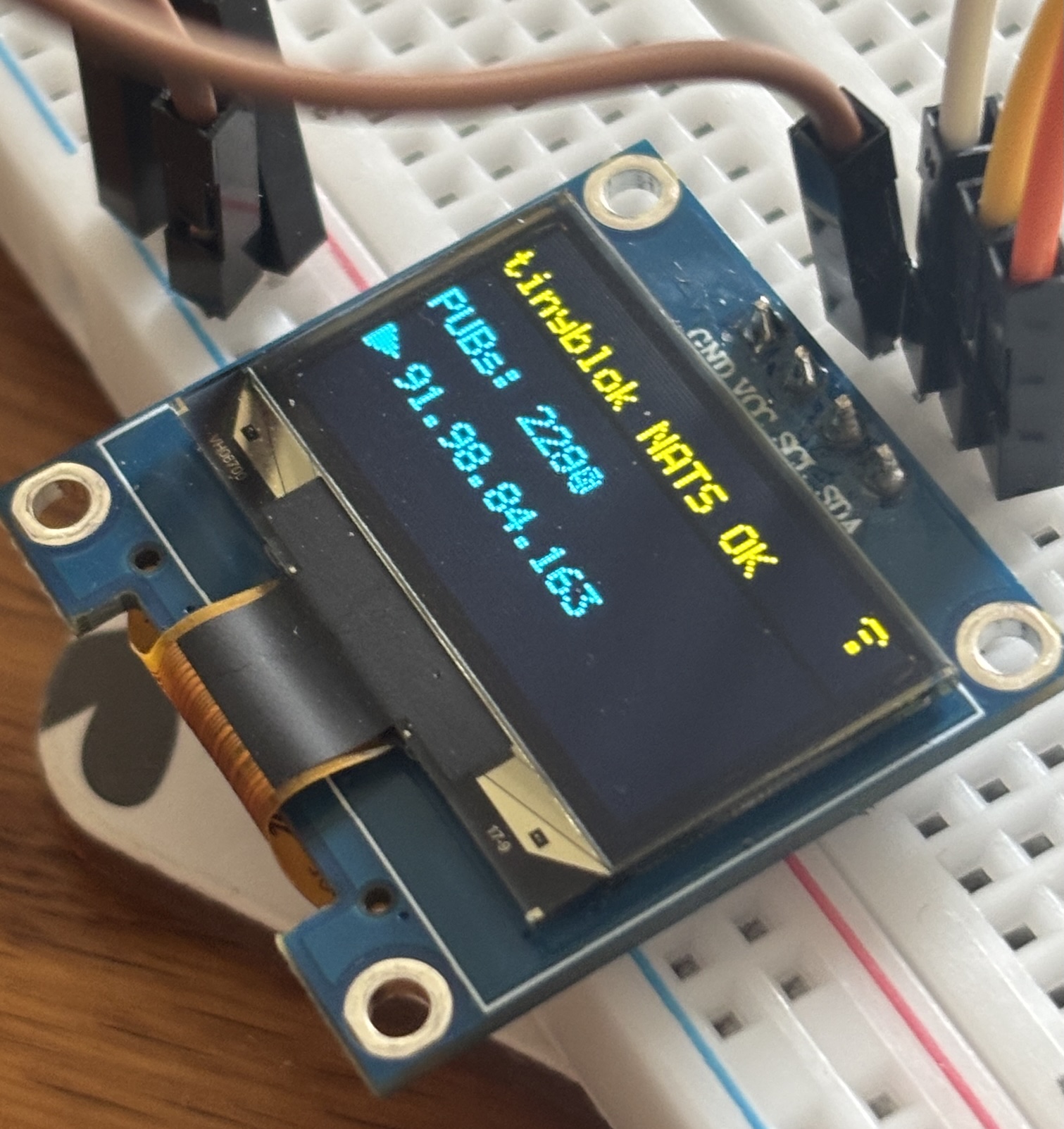
The firmware can show NATS connection status and publish counters on an I2C OLED. The defaults are a 128x64 panel on SDA GPIO14 and SCL GPIO15. Connect the display before flashing. Other panel sizes and pins are set with make menuconfig.
First-time setup#
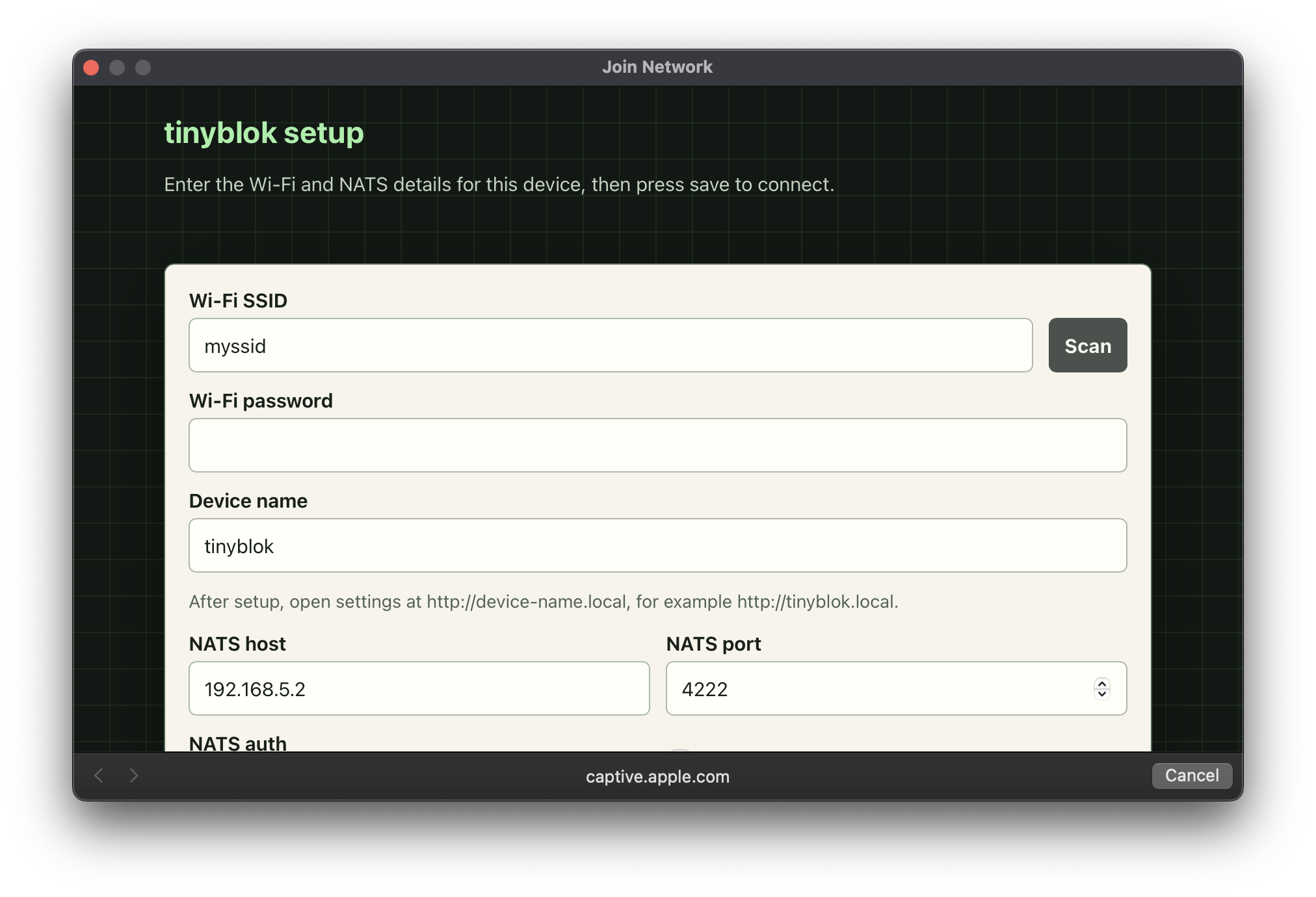
After flashing, the board starts its own Wi-Fi network and setup portal. No serial console or built-in credentials are needed.
- Join the
TINYBLOKWi-Fi network. - The setup portal should open by itself. If it does not, visit
http://10.42.0.1. - Enter your Wi-Fi, a device name and the NATS settings. Authentication can be none, user and password, or a NATS
.credsfile. - Save. The board tries the Wi-Fi connection, keeps the settings if it succeeds, and reboots.
Then watch the board's output on your NATS server:
nats sub 'tinyblok.>'
nats req tinyblok.req.uptime ''
Settings and reset#
Once configured, the settings page is at http://tinyblok.local on the same network. The device name becomes the hostname, so a board named kitchen is at http://kitchen.local. Use letters, numbers, spaces, underscores or hyphens; the firmware lowercases the name and turns separators into hyphens.
The same page is available as an HTTP API:
| request | meaning |
|---|---|
GET /api/status | connection state and counters |
GET /api/settings | current settings |
GET /api/wifi-scan | nearby Wi-Fi networks |
POST /api/settings | save settings |
POST /api/reboot | reboot the board |
POST /api/factory-reset | erase settings and return to the setup portal |
curl http://tinyblok.local/api/status
curl -X POST http://tinyblok.local/api/reboot
A factory reset erases the stored settings, and the board comes back up with the TINYBLOK network and setup portal. While developing, make erase-flash-monitor wipes the whole flash over serial.
Change the rules#
Rules live in patchbay.edn at the root of the tinyblok repository. Edit it, check it on your computer, then rebuild and flash:
make soundcheck
make build
make flash
make soundcheck builds a host validator from the same C sources the firmware uses. Pass PATCHBAY_FILE=path/to/patchbay.yml to check a different file.
To embed a YAML or JSON patchbay, pass -DTINYBLOK_PATCHBAY_SOURCE=patchbay.yml through CMake. That build includes the structured parser as well, so the image is larger. EDN keeps the small parser only.
The patchbay authoring skill covers Patchbay Lite, so Claude or Codex can write and check tinyblok rules too.
Add a sensor#
A sensor driver is a C function with no arguments that returns a reading:
static float board_temp_c(void)
{
    return 21.5f;
}
Register it in the native symbol table so the patchbay can find it by name. C cannot look up linked functions by name at runtime, so the table is explicit:
#include "tinyblok_patchbay.h"

size_t tinyblok_app_native_symbols(const tinyblok_native_symbol **out)
{
    static const tinyblok_native_symbol symbols[] = {
        {.name = "board_temp_c", .type = TINYBLOK_TYPE_F32, .fn.read_f32 = board_temp_c},
    };
    *out = symbols;
    return sizeof(symbols) / sizeof(symbols[0]);
}
Then declare the pump and write rules against its subject:
(pump "board.temp" :from board_temp_c :type f32 :hz 1)

(on "board.temp"
  (-> payload-float
      (moving-avg 30)
      (round 1)
      (publish! (subject-append "avg30s"))))
The :type decides the C signature:
:type | C signature |
|---|---|
u32 | uint32_t name(void) |
i32 | int name(void) |
f32 | float name(void) |
u64 or uptime-s | uint64_t name(void) |
Each pump gets its own timer. A pump read should return quickly and must not block or allocate.
Use tinyblok as a component#
A project of your own does not have to fork the repository. An ESP-IDF project can import tinyblok's main/ directory as its firmware component and supply only a patchbay and its native symbols. tinyblok keeps the boot flow, setup portal, Wi-Fi, NATS client and rule runtime.
cmake_minimum_required(VERSION 3.16)

set(EXTRA_COMPONENT_DIRS "/path/to/tinyblok/main")
set(TINYBLOK_PATCHBAY_SOURCE "patchbay.yml" CACHE FILEPATH "")

include($ENV{IDF_PATH}/tools/cmake/project.cmake)
project(my_sensor)
The component example in the repository is a complete project in this shape.
Request and reply#
on-req declares a NATS subject the board answers. tinyblok subscribes to each one after every connect, and replies go to the inbox the requester supplied.
(fn hello-c :from tinyblok_hello_c :input bytes :type bytes)

(on-req "tinyblok.req.uptime"
  (-> uptime-s
      (round 3)
      (reply!)))

(on-req "tinyblok.req.hello-c"
(reply! (hello-c payload)))nats req tinyblok.req.uptime ''
nats req tinyblok.req.hello-c tinyhiA reply can be a literal, a numeric rule result, the original request payload (reply! with no argument), or the output of a (fn ...) declared with :input bytes :type bytes.
This suits small control actions that are not continuous telemetry: reading uptime, starting a sensor sweep, switching a relay, or taking a one-off diagnostic sample. The subjects are fixed at build time, like the rest of the patchbay. There are no runtime subscriptions and no pending request table on the board.
If many boards share one request subject, a single request reaches all of them and each replies. A client asking a fleet should wait for several replies, not stop at the first.
When the network drops#
publish! does not write to the socket. It queues a subject and payload in a fixed-size ring, and the main loop drains the ring to NATS. If Wi-Fi or the server stalls, the ring drops the oldest samples and rule evaluation carries on. For telemetry this is usually what you want: after an outage the board sends recent readings, not a backlog.
More reading#
- The tinyblok repository has the source, wiring notes and the full
makecommand list. - Meet tinyblok is the introductory blog post.
MIT licensed · © 2026 Alex Reid
Lexvica offers solutions built with monoblok.